Remove filler words from dictation automatically
Last updated 2026-11-01 · by Venu Gopal Reddy Muvva, founder
DictationDesk removes filler words automatically before your dictation is typed: “um”, “uh”, “you know”, false starts and repeated words are dropped, and when you correct yourself with “no wait” or “I mean” only the correction is kept. You can see it work in your browser today by pasting a messy sentence into the try-it page.
The problem
Nobody speaks in finished sentences. Raw transcripts are full of fillers and restarts, and cleaning them up by hand takes longer than typing would have.
How to do it with DictationDesk
- Create your free account. Sign up with email or Google. No card.
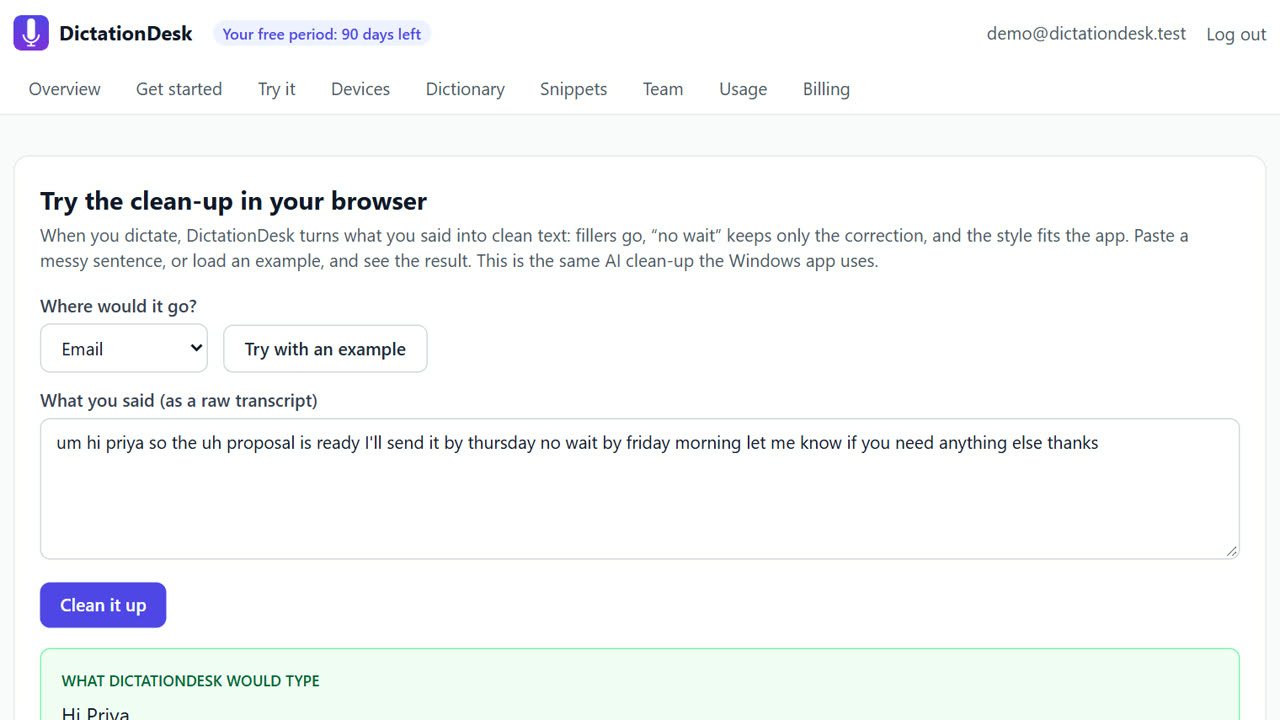
- Open Try it. In your dashboard, open Try it. Choose where the text would go: email, chat, document or code editor.
- Paste or load an example. Paste something you said, or click “Try with an example” to load a sentence with fillers and a correction.
- Clean it up. Press “Clean it up”. The AI clean-up removes fillers, applies the correction and fixes punctuation, the same clean-up the Windows app uses.
- Use it everywhere. With the Windows app, the same thing happens every time you hold Ctrl+Win and speak.
Tips
- “Scratch that” deletes the last sentence you said.
- The on-device cleaner works offline; the AI clean-up adds smarter rewording when online.
- The clean-up never adds content or answers questions in your text.
When DictationDesk is not the right tool
If you need a verbatim transcript, with every “um” kept for legal or research records, turn the clean-up off or use a transcription service; DictationDesk is built to give you the text you meant, not every sound you made.
Questions
Will it change my meaning?
It is told to keep your words and meaning and not to add content. Outputs that look like an answer instead of a rewrite are rejected.
Does the try-it page cost anything?
₹0 during your free period. After it, an AI clean-up is about ₹0.02 (our estimate).
Does it work for Hinglish?
Not yet; Indian languages are switched off for now.
Where things stand: the DictationDesk Windows app is in private testing and not downloadable yet. Today you can create your account, set up your dictionary, snippets and team, and try the AI clean-up in your browser. We email you when the app is ready. macOS and phone keyboards are planned, with no date yet.
Price: free for your first 3 months, with everything unlocked. After that you pay only for what you use, at our cost with no markup: about ₹2.20 per hour of cloud audio and ₹0.02 per AI clean-up (our estimates). Offline dictation is ₹0. No card needed to start.
Related: Dictate emails in Outlook and Gmail · Rewrite selected text by voice (command mode) · DictationDesk vs Wispr Flow · Pricing